![Chaser-logo-new-white.svg]](https://help.chaserhq.com/hubfs/09%20CHASCEND%20THEME/Logos/Chaser%20Logo/Chaser-logo-new-white.svg)
Last updated: January 01, 1970
Credit reports are currently not available to Xero App Store subscribers. If you'd like to buy credit checks, please email us at support@chaserhq.com and ask us to migrate you to Chaser billing.
Business credit check
A business credit check is your first line of defence when avoiding bad debtors. A business credit check looks into the financial history of your potential/current customer and highlights any potential red flags in their credit history and payment behaviour. Credit checks are carried out by CreditSafe.
Credit checking
Every customer you take on represents a certain level of risk, and that risk is compounded if you plan to offer them a line of credit. Thankfully, modern businesses now have more comprehensive business credit checks that give them insight into a potential customer's current and historical financial information.
Credit checking is an essential first step before taking a customer's business and extending a line of credit. Additionally, ongoing credit monitoring can be an essential part of continuous risk assessment, ensuring that your customers are still creditworthy and that you aren't due any surprises later on.
Credit checks are available in the following regions. We're working on expanding availability.
| Austria | Japan |
| Belgium | Luxembourg |
| Canada | Mexico |
| Denmark | Netherlands |
| France | Norway |
| Germany | Sweden |
| Ireland | United Kingdom |
| Italy | United States |
Get a credit report
- Either visit the Credit Check section of the app, navigate to Receivables and select the customer and then Get credit report, or navigate to Organization settings > Add-ons.
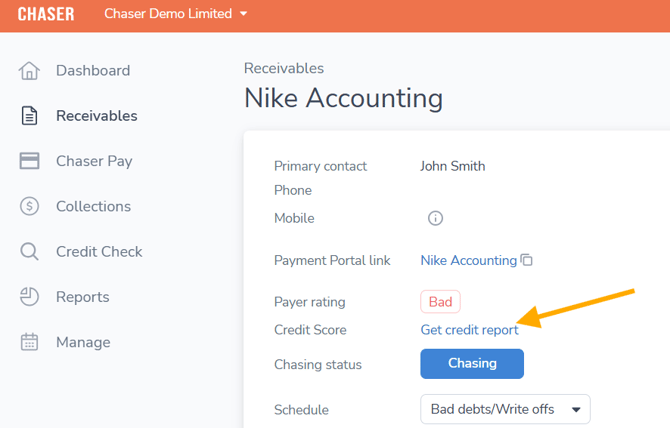
- Search for the company using any of the following search criteria: company name, address (city, province, post code), company number, VAT number, website, or a combination of these.
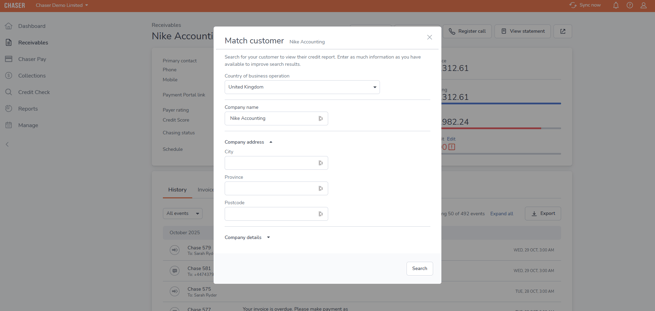
- Where multiple results are available, you will be asked to select the appropriate company.
Once you have purchased a report, the report and credit score will be visible on the customer page. Monitoring will be automatically enabled for the report (if purchased from the individual customer page) except in Mexico.
Credit checks must be run from customer-specific pages via the Receivables tab to benefit from ongoing monitoring. Checks purchased via the Credit Check tab will not be subject to ongoing monitoring.
Get a credit report for a potential customer
- Navigate to the Credit Check tab in the left-hand side menu.
- From here, search for the company using any of the following search criteria: company name, address (city, province, post code), company number, VAT number, website, or a combination of these.
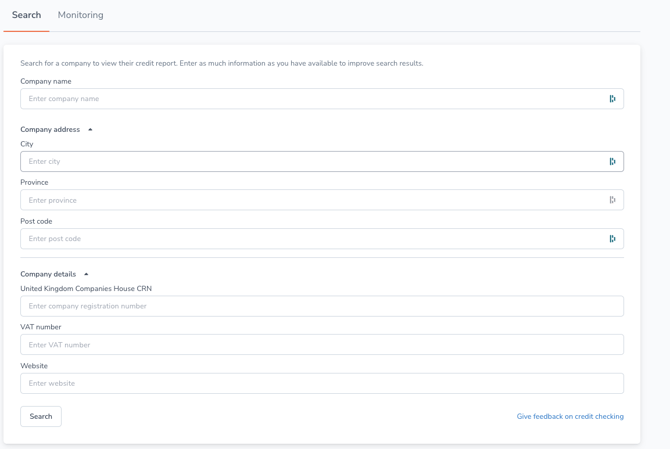
- Once you have identified the company you want to credit check, click Get credit report.
- You will then have immediate access to a full credit report for that company. This includes a summary detailing the customer's risk, the recommended credit limit, information on the Directors & Shareholders, the company's Financials, and an Event History.
- Monitoring is not available for reports purchased from this section.
Credit report details
A credit report gives your customer a credit score and highlights any potential business risk in doing business with them. It also usually contains the following information:
- A credit score with a recommended credit limit (see our guide on how to set credit limits).
- General information regarding the business, the directors, and shareholders.
- The business' payment score.
- The business' credit event history.
- The business' directors and filing information.
Monitoring
If your customer is based in any of the countries listed below and their credit report changes, Chaser will notify you of an event in Recent Events. You can also see the changes if you navigate to the Credit Checking page under the Monitoring tab. You will only be updated on your purchased reports.
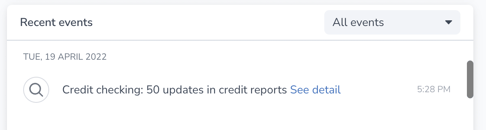
Keeping up to date with changes to your customer's financial health is essential to protect your business and cash flow. These advanced warnings mean you can make decisions and act quickly to protect your business.