![Chaser-logo-new-white.svg]](https://help.chaserhq.com/hubfs/09%20CHASCEND%20THEME/Logos/Chaser%20Logo/Chaser-logo-new-white.svg)
Task list
The task list displays all tasks that are due to be completed. By default, it only shows your assigned tasks. You can see all tasks by selecting the All assignees in the drop-down menu.

View a list of completed tasks in the Completed tab.
The tasks list provides you with the following information.
-
Customer name
-
Assigned user
-
The number of outstanding invoices associated with a customer
-
Overdue amount: The total overdue for all invoices eligible for a phone call. Payments (including partial payments) are deducted from the amount. Overdue instalments will only be considered if an invoice is placed on a payment plan before due invoices are omitted.
-
Due date: The date the tasks should be completed.
You can see all the contact numbers associated with your contact. Contact numbers are managed within your account system, ERP, or data imports if using our CSV or API integration.
Tasks can be created or updated by Owners, Managers, or Contributors. Contributors may only update tasks assigned to them.
Task types
Call reminder
A reminder for the assigned user to perform a phone call relating to a customer or an invoice. This task type allows the user to register a call with results such as Answered, Not answered, Left voicemail, or Skipped, and provides options to Reschedule a call later.
Get credit report
A reminder for the assigned user to request and review a customer’s credit report to assess financial risk and inform next steps in the collections process. Credit checks are available here.
Book meeting
A reminder for the assigned user to to arrange a call or meeting with the customer to discuss overdue invoices, payment plans, or account concerns.
Validate invoice information
A reminder for the assigned user to verify invoice accuracy, ensuring amounts, due dates, and billing details are correct before initiating further actions.
Update invoice
A reminder for the assigned user to correct invoice details, apply discounts, extend due dates, or make other necessary adjustments.
Offer payment plan
A reminder for the assigned user to propose or negotiate a structured payment plan for the customer to settle outstanding balances in instalments.
Escalate to collections
A reminder for the assigned user to transfer the overdue invoice to the Chaser collections team for further recovery action.
Custom
A flexible task type created for activities not covered by the default types, allowing teams to track unique or bespoke actions.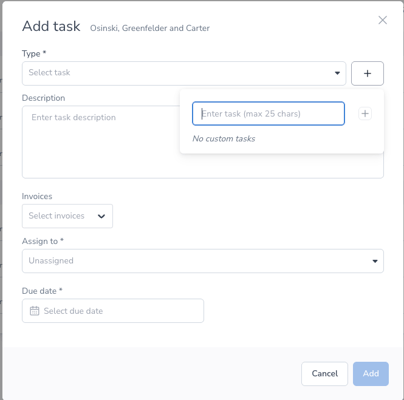
Related Articles