![Chaser-logo-new-white.svg]](https://help.chaserhq.com/hubfs/09%20CHASCEND%20THEME/Logos/Chaser%20Logo/Chaser-logo-new-white.svg)
What are ageing buckets?
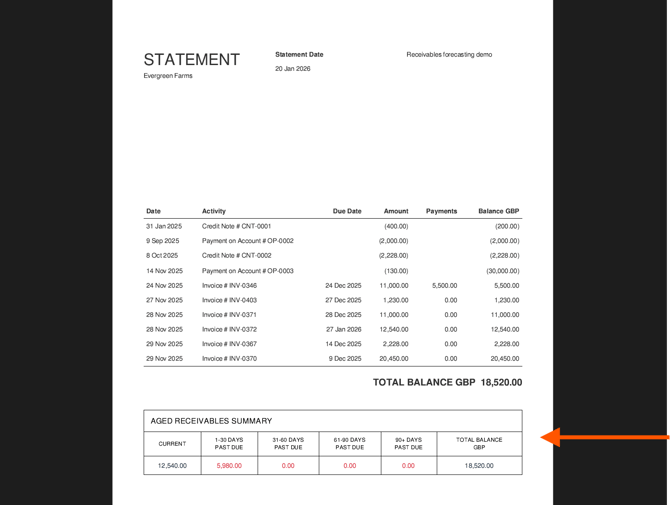
Ageing buckets, also referred to as an Aged Receivables Summary is a section that appears at the bottom of customer statements. It provides a quick snapshot of the total balance due, broken down by how long the amounts have been outstanding.
Instead of just showing a single "Total Due" figure, this table categorizes debt into timeframes (buckets) such as:
-
Current: Invoices that are not yet past their due date.
-
1–30 Days Past Due: Invoices overdue by a month or less.
-
31–60+ Days Past Due: Invoices that have been overdue for longer periods.
How are the amounts calculated? (The FIFO Principle)
Our system calculates these buckets using a First-In, First-Out (FIFO) principle.
This means that when calculating the age of the debt, the system assumes that any unallocated payments or credits are used to pay off the oldest invoices first.
-
The system looks at the oldest debt on record.
-
It applies any general payments or credits to clear that old debt first.
-
Any remaining balance is then categorized into the appropriate bucket based on the due date of the remaining unpaid invoices.
Why is this useful? Enabling this feature gives your customers immediate clarity on the status of their account. It helps them see not just what they owe, but which specific debts are becoming urgent, reducing back-and-forth communication regarding overdue balances
How to turn on ageing buckets on statements
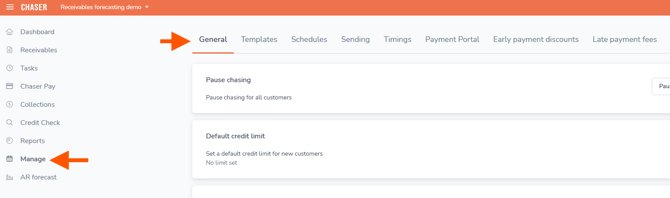
1. Navigate to Manage --> General dashboard in Chaser
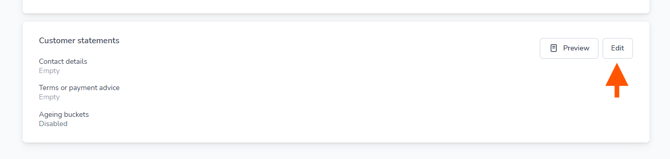
2. Scroll down to Customer statements and select Edit
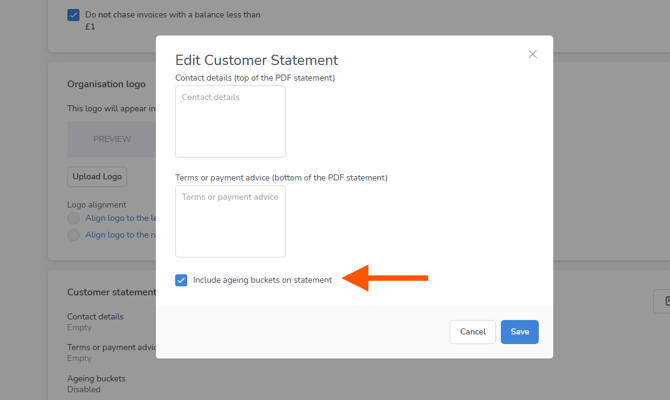
3. Select Include ageing buckets in statements and then select Save
4. To test the setting has been applied select Sync in the top bar and then refresh your browser window. This will clear any cached data.

5. Navigate to a customer and select View statement

6. Your statement contains the customer ageing buckets