![Chaser-logo-new-white.svg]](https://help.chaserhq.com/hubfs/09%20CHASCEND%20THEME/Logos/Chaser%20Logo/Chaser-logo-new-white.svg)
By enabling these options, you can reduce manual intervention and ensure you aren't sending payment reminders to customers who have already settled their accounts or have valid reasons for withholding payment.
Accessing chase criteria
You can find these settings in Manage > General tab> Chasing criteria section.
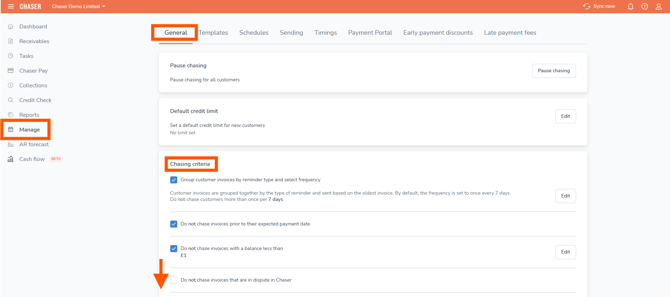
Available criteria options
Here is a breakdown of how each setting functions and when to use them.
1. Do not chase invoices that are in dispute

-
The problem: A customer disputes an invoice (e.g., wrong goods received). You mark it as "In Dispute" within Chaser, but if you forget to pause the specific schedule, an automated chase is sent.
-
The solution: By checking this box, Chaser will automatically suppress payment reminders for any specific invoice marked as "In Dispute."
-
Note: If a customer has multiple invoices, those not in dispute may still be chased depending on your schedule settings.
-
2. Do not chase invoices with active direct debit mandates

-
The problem: Accidents happen. Even if a customer is set up for Direct Debit, you might accidentally toggle their status to "Chasing" via a bulk action update.
-
The solution: This setting acts as a global fail-safe. When enabled, if Chaser detects an active Direct Debit mandate for a customer, it will strictly prevent any chase emails from going out for that customer, overriding any manual schedule settings.
-
When to leave this OFF: If you have a specific reason to chase a Direct Debit customer (e.g., a failed payment or a separate ad-hoc invoice), leave this unchecked.
-
3. Do not chase invoices if there are unallocated payments or credit notes

-
The problem: A customer makes a bulk payment, but your accounting system hasn't allocated that specific cash to the specific invoice yet. Chaser sees the invoice as "unpaid" and sends a reminder.
-
The solution: This setting pauses chasing if any unallocated payments or authorized credit notes are associated with that customer.
-
Key Distinction: This pauses chasing simply because an unallocated item exists, even if the customer still owes you money overall. It is a safety measure to give you time to reconcile.
-
4. Do not chase invoices where the net balance is zero or in credit

You can now automatically exclude customers from being chased when their net balance is £0 or in credit; this goes beyond looking at just credits and overpayments.
-
Who is this for? This option is designed for users who typically say:
-
"We chase on outstanding balance, not per invoice."
-
"I'm worried about credit notes throwing off my chasing."
-
-
The solution: This logic checks the customer's total standing. If their overall account balance is 0 (flat) or negative (in credit), Chaser effectively treats the account as settled and will not send chase emails.
-
The outcome:
-
Avoid chasing customers incorrectly when the math implies they are settled.
-
Eliminate the need to manually check balances before chasing.
-
Improve customer relationships by acknowledging their true financial standing.
-
Frequently asked questions
What is the difference between "unallocated payments/credits" and "net balance" chase criteria options?
The net balance option is more aggressive.
-
Unallocated: Pauses chasing if any remaining credit (credit note or overpayment) exists, even if the customer still owes you £10,000. It assumes you need time to tidy up the admin.
-
Net balance: Only pauses chasing if the customer's total debt is fully covered (Balance is £0 or less). If they have a credit note but still owe you money overall, they will still be chased. For high-volume invoicing, the Net Balance option is often more appropriate.
Will an invoice excluded by these settings appear in the Forewarn email?
These settings act as a dynamic fail-safe. If the criteria are met (e.g., Net Balance is £0), the invoice should be excluded from the Forewarn because the system is dynamically suppressing the chase. However, because this is a dynamic check, we cannot turn "Chasing" off at the static customer/invoice level. If you turn the criteria off, chasing will resume as usual.