![Chaser-logo-new-white.svg]](https://help.chaserhq.com/hubfs/09%20CHASCEND%20THEME/Logos/Chaser%20Logo/Chaser-logo-new-white.svg)
The Chaser AI assistant uses advanced artificial intelligence to streamline credit control processes and manage customer communications. This article explains how to access and use the AI assistant within your Chaser workspace.
Note: The AI assistant is currently available to users on the Complete plan. It will be available as an add-on for other plans.
What is the Chaser AI assistant?
The AI assistant is an integrated chat tool in Chaser. Rather than navigate menus to find specific invoices or write payment reminders from scratch, you ask the assistant to do it.
It uses Google Gemini Flash, a Large Language Model (LLM), to process accounts receivable data and provide context-aware responses.
Key capabilities
The AI assistant focuses on data retrieval. We continue to add functional tools. Current capabilities include:
-
Digest data quickly: Ask the AI to pull specific data from Chaser. For example, type "Pull my top 10 highest status debtors," or "Pull the top 10 overdue invoices." The AI builds a table with that detail.
-
Optimize chase schedules: You ask the AI to improve your chase schedules. The AI creates new templates, builds new schedules, and assigns customers to those schedules to ensure you use the appropriate tone and communication channels.
How to access and use the AI assistant
1. Open the chat panel: Click the star icon  in the top right menu bar of the Chaser dashboard.
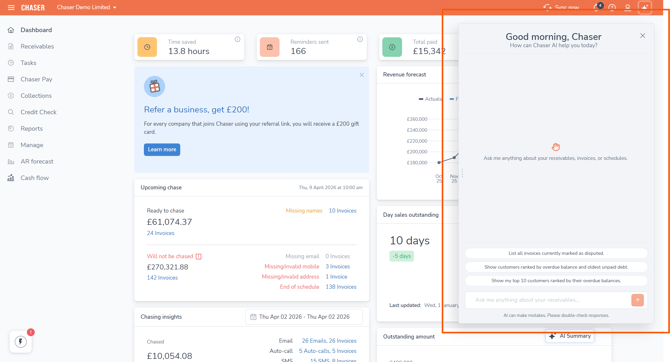
2. Ask a question or give a command: Type your request in everyday language.
3. Review and approve: The AI operates on a "human-in-the-loop" system. It does not apply changes automatically. You review and approve all actions before they execute.
Generate new schedules and templates
Follow these steps to use the AI to optimize your accounts receivable automation:
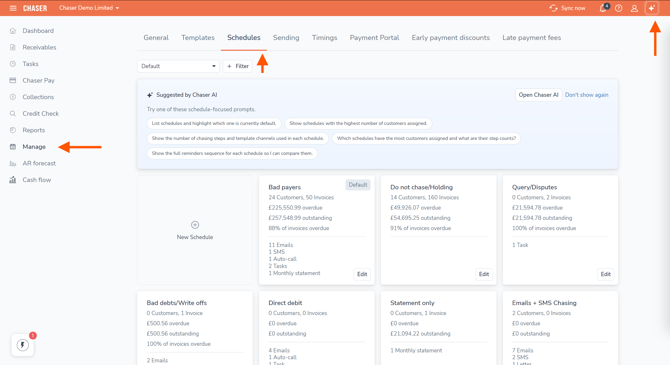
1. Navigate to schedules: Click the Manage tab in your Chaser workspace, then select Schedules.
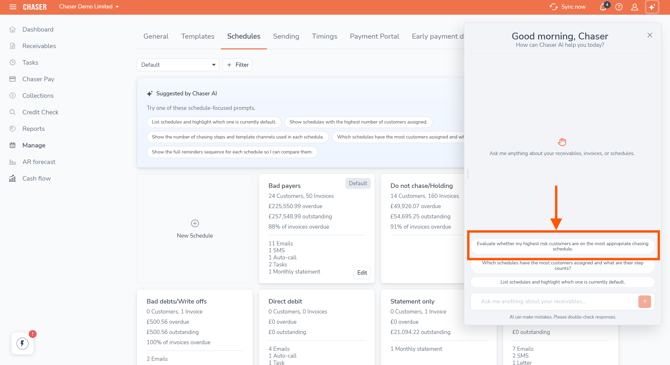
2. Select a prompt: Choose from the provided AI schedule prompts to ask the assistant to improve your chase schedules.
-
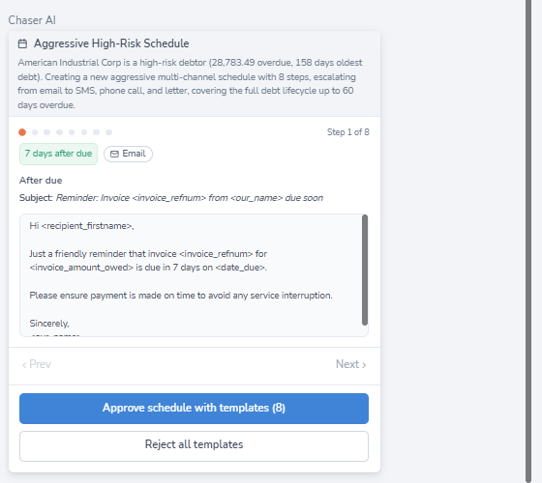
Review the schedule: The AI builds the new schedule and assigns specific customers to it. It presents an example of this new schedule for your review.
-
Approve the assignments: Once you review the example, you approve the contact moves. The AI applies the new schedule to those contacts only after you provide final approval.
Security and privacy
Secure API integrations power the assistant:
-
Your data is siloed: We protect your company financial data and customer details. We do not use them to train public AI models.
-
Role-Based Access Control (RBAC): The AI assistant adheres to your current user permissions. It only accesses and displays data that the current user has authorization to see.
-
Enterprise-grade encryption: We encrypt all data processed by the AI in transit and at rest to maintain Chaser compliance and security standards.
Frequently asked questions (FAQ)
Does the AI send emails or change schedules automatically without my permission?
No. The AI does not operate autonomously. You review, edit, and approve new templates, schedules, and contact assignments before they go live.
What technology powers the AI assistant?
We use an advanced LLM because it offers complex logic and fast response times. This ensures your workflow remains uninterrupted while the AI handles complex financial data.
Is there an extra cost for the AI assistant?
The AI assistant is included for users on the Complete plan. We plan to offer it as an optional add-on for other plans. Please refer to our price page or contact your account manager for details.