![Chaser-logo-new-white.svg]](https://help.chaserhq.com/hubfs/09%20CHASCEND%20THEME/Logos/Chaser%20Logo/Chaser-logo-new-white.svg)
Last updated: January 01, 1970
Keep your communications organised by logging emails in Zoho CRM. To get started, connect your email account to Chaser using the direct email integration.
Set up email logging in Chaser
-
Set up your BCC email address from Zoho.
-
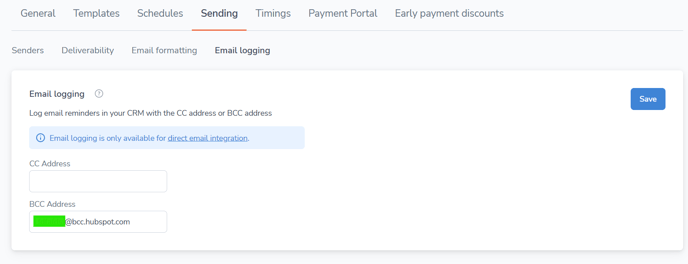
In Chaser, go to Manage > Sending > Email Logging.
-
Paste your Zoho BCC address into the field provided.
 Choosing between BCC and CC
BCC
BCC is best if you are already using the Zoho email integration and associating emails that you manually send with contacts. The BCC option logs the first message sent through Chaser without duplicating entries created in Zoho for replies manually sent by you.
CC
If the Zoho email extension isn’t installed, enter the BCC address into the CC field in Chaser instead. If someone replies using reply instead of reply all, you can manually add the CC address back into the thread to keep it logged.